


0.3s average response

99.99% uptime

195+ Countries


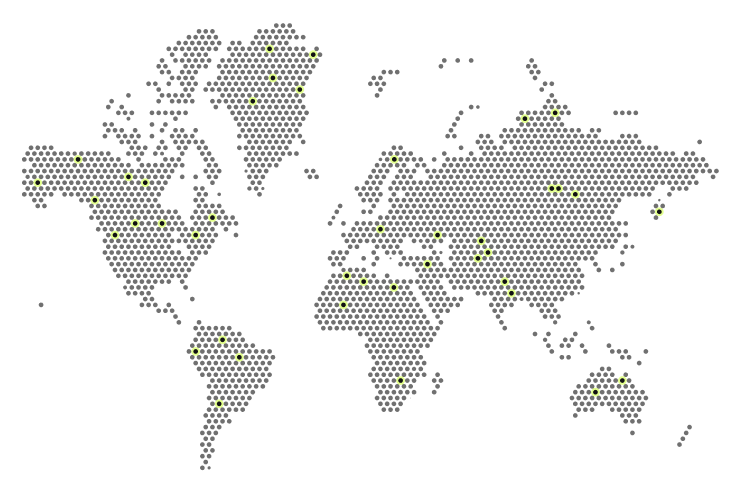
Discover the global proxy network
A reliable service with over 110 million IP addresses covering 195 countries worldwide.

United Kingdom
326K+ active IPs per month

Germany
296K+ active IPs per month

USA
580K+ active IPs per month

France
73K+ active IPs per month

Japan
139K+ active IPs per month

Türkiye
490K+ active IPs per month

China
1.2M+ active IPs per month
A detailed comparison of personal SOCKS5 proxy plans
Choose the option that best suits your needs
1000+
400+
100+
Latest articles and news
FAQ
What are residential proxies?
Residential proxies are proxy servers that use IP addresses provided by internet service providers (ISPs) and/or are located on real (residential) devices, such as laptops, desktops, smartphones, etc. They allow users to connect via an IP address from another region and obtain a local access point for the desired geolocation.
Residential proxies have many advantages and applications, including:
- Increasing connection privacy and reducing tracking when working with public data.
- Testing geo-dependent websites and services from the desired region, verifying localized search results and content.
- Increasing the efficiency of web scraping and collecting publicly available data from open sources.
- Distributed load testing and API integrations from different IP addresses.
- Launching advertising campaigns in different regions.
Unlike server proxies, residential proxies are considered more reliable and better protected from tracking. The residential proxy market offers IP addresses in thousands of locations worldwide, providing a wide selection of connection points for various tasks. Another advantage of residential proxies is that they can have multiple IP addresses at once, allowing for scalable parallel connections for data collection and SEO monitoring.
What is your IP address pool?
By purchasing a plan, you gain access to over 110 million IP addresses collected legally and ethically from all over the world. It’s important to note that the availability of IP addresses at any given time is affected by factors such as time of day and proxy list settings.
Is the IP address stored on my computer?
No, the residential proxy’s IP address is not stored on your computer. When you buy and use a proxy, your computer connects to the proxy server, which redirects your Internet traffic through its IP address. This IP address belongs to the proxy server, not your computer.
Your computer only stores proxy connection settings that allow it to send traffic through the proxy server. The proxy IP address itself is not stored on your device as part of its configuration. Instead, with each request, your computer uses the specified proxy IP address to access the Internet, passing requests through the server’s IP address rather than directly from your device.
How quickly will I receive the proxy after payment?
After purchasing proxies on the website, you’ll gain access to them almost instantly. Typically, the process takes just a few minutes, as the automated system processes the order and provides you with the necessary proxy connection details.
If any delays occur, they may be due to payment verification, but in most cases, proxies are available immediately after the transaction is completed.
How does IP address list authorization work?
When creating a list of dynamic residential proxies, two authorization options are available for users: by login and password or by a list of IP addresses specified in the corresponding field when creating the proxy list. When selecting the “IP list” authorization method, simply connect to the proxy using the previously specified list of IP addresses. However, users can also use the proxy using a login and password from devices with different IP addresses.
Important!
Each IP address added to the list of allowed IP addresses can only be specified once. To reuse this IP address when creating a proxy list, you must delete the previously created proxy list in which this IP address was added to the list of allowed IP addresses.
Can I change my IP address using a link?
This type of rotation is only available for Dynamic Proxies. For dynamic proxies, the Prosox platform offers the ability to select a rotation period based on the following conditions: no rotation (sticky session), per request, or time-based (every 5, 10, 15, or 20 minutes). Due to the nature of residential proxy technology, this approach is a much more stable, faster, and easier way to change an IP address than manually changing it.
Can I test proxies before purchasing?
Yes, you can test proxies on our website before purchasing. Simply contact support with the reason for using them.
We offer plans with a trial period, allowing you to evaluate the service without having to make a full upfront payment.
You can also get residential proxies with limited traffic for a small fee, allowing you to test their performance and functionality.
Do you have duplicate IP addresses?
We strictly monitor the quality of our proxies, ensuring their uniqueness and eliminating any duplicates. Our system ensures uninterrupted rotation of active IP addresses, automatically deletes unused servers, and promptly updates IP addresses, allowing us to provide stable and reliable services.

Would you like to receive a personalized offer?
If you need technical advice or have a specific request, please contact us.
What Makes a Dedicated SOCKS5 Proxy Different from Shared Alternatives in 2026
A dedicated socks5 proxy gives you complete ownership of an IP address that no other customer can use at the same time. This single factor changes everything for serious automation work.
When multiple users share the same residential or ISP addresses, websites see coordinated patterns and apply blocks faster. A dedicated socks5 proxy removes that risk entirely. You get predictable session behavior, stable cookies, and consistent geolocation — all critical for high-success-rate operations.
Key Differences That Actually Matter
- IP Exclusivity — Your address belongs only to you. No rotation caused by other users and no “guilt by association” blocks.
- Session Stability — Sticky sessions stay alive longer because the IP is not under pressure from dozens of simultaneous connections.
- Lower Ban Rates — Dedicated socks5 proxies consistently show higher success rates on platforms that actively monitor proxy pools.
- Better Resource Allocation — The proxy server dedicates bandwidth and connection slots to your traffic instead of splitting them across many users.
Dedicated SOCKS5 Proxy Performance Benchmarks: Verified Metrics from Prosox
Prosox publishes clear performance numbers for its dedicated socks5 proxy network. These are not marketing claims — they are the actual operating parameters you can expect.
Core Network Metrics
- Total IP pool: 110+ million addresses
- Countries covered: 195
- Average response time: 0.55 seconds
- Uptime guarantee: 99.99%
- Success rate: 99.9%
- Authorization methods: Username/password or IP whitelisting (each IP assigned to one account only)
Real Pool Sizes in Major Markets (Active IPs per Month)
- United States — 580,000+
- United Kingdom — 326,000+
- Germany — 296,000+
These volumes allow precise city-level and ISP-level targeting while keeping every IP dedicated to a single user.
Dedicated SOCKS5 vs ISP Proxies vs Mobile Proxies: Which Type Delivers the Best Results
Prosox offers three dedicated socks5 proxy categories. Choosing the right one depends on your specific risk profile and target platforms.
| Use Case | Recommended Type | Why It Wins | Starting Plan Example | Approx. Entry Cost |
|---|---|---|---|---|
| High-volume web scraping & data extraction | Premium Residential | Best balance of trust signals + flexible traffic scaling | SX 10 GB or SX 25 GB | $9–$20 |
| Multi-account management & advertising | ISP Proxies | Highest trust level, static IPs, lowest verification friction | ISP-10 or ISP-20 | $22–$40 |
| Mobile-specific content & geo-targeting | Mobile Residential | Genuine 4G/5G carrier IPs when residential and ISP are blocked | M 10 GB or M 25 GB | $27–$65 |
| Maximum budget efficiency at scale | ISP Proxies (higher tiers) | Lowest per-IP price at volume (down to ~$1.55/IP) | ISP-50+ | From $90 |
Rule of thumb: Start with ISP proxies when account bans cost you real money. Use Premium Residential when you need maximum volume flexibility. Switch to Mobile only when the other two types are already blocked on your targets.
How to Choose the Best Proxy Plan for Web Scraping, Account Management, and Advertising
Proxy Setup for Web Scraping at Scale
- Choose traffic-based Premium Residential plans (SX series).
- Use sticky sessions for 10–30 minutes to keep cookies and headers consistent.
- Scale to 25 GB+ packages for better per-GB pricing ($0.80–$0.75/GB).
- Combine with proper user-agent rotation and request throttling.
Proxy Setup for Multi-Account Management
- Choose ISP Proxies with quantity-based pricing.
- Keep IPs static (no rotation) for each account profile.
- Whitelist only the IPs you actively use.
- Start with ISP-10 or ISP-20 for testing, then move to ISP-50+ for production.
Proxy Setup for Advertising Campaigns & Verification
- ISP Proxies again win here because ad platforms heavily penalize residential proxy patterns.
- Use dedicated, non-rotating IPs with clean history.
- Maintain separate browser profiles per IP.
How to Configure in Real Tools
In Python (requests + PySocks)
import requests

proxies = {
    'http': 'socks5://username:password@host:port',
    'https': 'socks5://username:password@host:port'
}
response = requests.get('https://example.com', proxies=proxies, timeout=10)
In Anti-Detect Browsers (FlashID, Afina, GoLogin, etc.)
- Create a new browser profile.
- Go to Proxy settings → SOCKS5.
- Enter host, port, username, and password from your Prosox cabinet.
- Test geolocation and WebRTC leak before saving the profile.
- Link one dedicated socks5 proxy to one profile only.
In Scraping Frameworks (Scrapy / Puppeteer)
- Use the same SOCKS5 credentials in middleware or launch options.
- Implement retry logic with exponential backoff when success rate drops below 95%.
- Rotate user-agents and headers on every new sticky session.
Proven Strategies to Maximize ROI and Minimize Blocks
- Match proxy type to platform risk — Never use cheap shared residential proxies on high-value accounts.
- Start small and scale winners — Test 5–10 dedicated socks5 proxies for 3–5 days before committing budget to larger packages.
- Monitor success rate daily — If it drops below 92% on a specific target, change session settings or switch proxy type immediately.
- Use volume discounts — Moving from SX 10 GB ($0.90/GB) to SX 100 GB ($0.75/GB) saves 16.7% on traffic cost.
- Keep browser fingerprints unique — One dedicated socks5 proxy per anti-detect profile is the golden rule.
- Rotate only when necessary — Many platforms tolerate sticky sessions of 15–30 minutes without issues.
Common Mistakes When Using (and How to Avoid Them)
- Using the same IP across multiple high-risk accounts — Solution: One dedicated socks5 proxy = one account/profile.
- Ignoring volume pricing tiers — Solution: Calculate cost per successful request, not just per GB or per IP.
- Rotating IPs too frequently on login flows — Solution: Use sticky sessions for authentication steps.
- Skipping connection tests before scaling — Solution: Always test latency and success rate on your actual target before buying larger packages.
- Mixing proxy types in the same campaign — Solution: Standardize on one type (ISP or Residential) per project for cleaner data.