
Afina Browser for proxies and multi-account workflows
16 Jul 2026
Reading time ~ 7 mins
When a workflow includes dozens of profiles, different proxies, cookies, team members and repeated browser actions, a regular browser quickly becomes hard to control. Sessions live too close to each other, context gets mixed, and network settings are managed outside the real work environment. For multi-account work, teams need a separate layer where profiles, proxies, fingerprints and automation stay connected.
Afina Browser is an antidetect browser for teams and specialists who manage multiple accounts through proxy-based workflows. It helps create separate browser profiles, assign and check proxies, manage cookies, run scripts and keep operational tasks organized in one workspace.
This guide is written for users who already work with proxies in marketing, SMM, e-commerce, Web3, research, traffic arbitrage or operations. The focus is practical: how Afina keeps a profile, proxy and workflow together without turning the process into scattered spreadsheets and manual checks.
What is Afina Browser
Afina Browser is a workspace for managing browser profiles. Each profile works as a separate account environment with its own cookies, localStorage, cache and network settings. This structure is useful when a team needs to separate projects, roles, regions, platforms or testing stages.
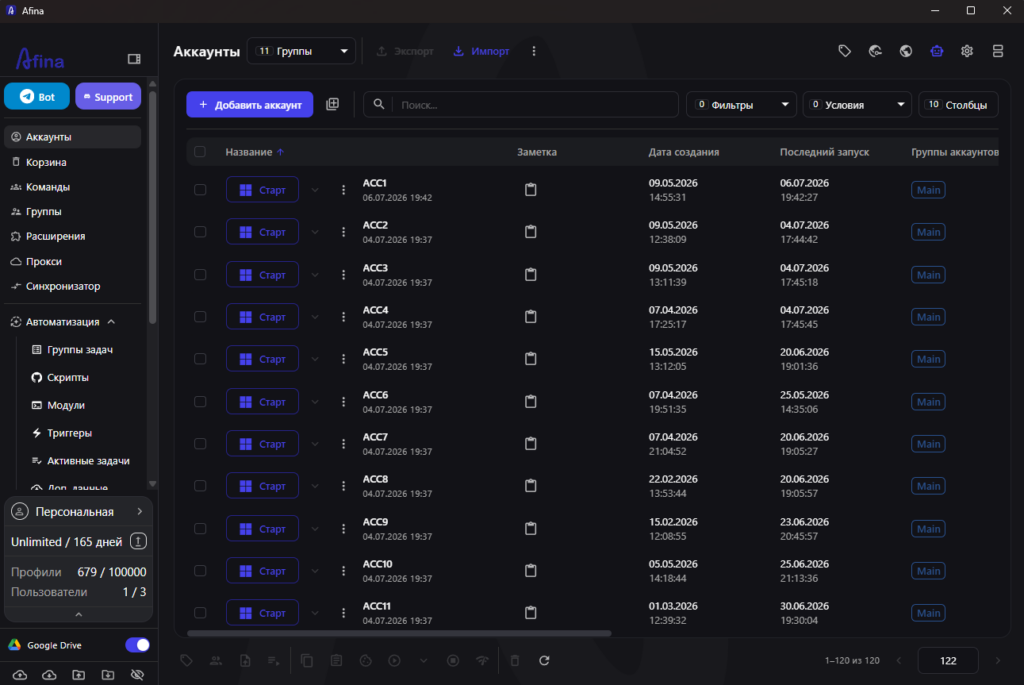
In Afina, profiles can be created manually, imported from Excel and TXT files, or moved from other antidetect browsers through a local API. The account table gives teams a single place to filter profiles, add tags, assign groups, start sessions and stop sessions.
Before building a larger setup, it helps to understand how profiles, fingerprints and proxies work together. Afina has a practical introduction to browser profiles, fingerprints and proxies.
Who Afina is for
Afina is useful for more than just storing proxy credentials. It becomes valuable when a proxy needs to be tied to a stable profile, a clear session and a repeatable process. If the IP changes but the fingerprint, cookies and behavior are not managed consistently, the environment becomes harder to operate.
Typical users include:
- SMM teams that manage several brands or content directions
- performance and affiliate teams that separate tests, regions and funnels
- eCommerce specialists working with different stores, accounts and platforms
- Web3 teams that need to distribute profiles across projects
- research and operations teams that need separate working sessions
- automation specialists running repeated browser actions
Afina does not replace platform rules or guarantee outcomes. Its role is more practical: to organize profiles, proxies, sessions and automation so the team can see what is running, which settings are used and where each account belongs.
Proxies, fingerprint and network settings
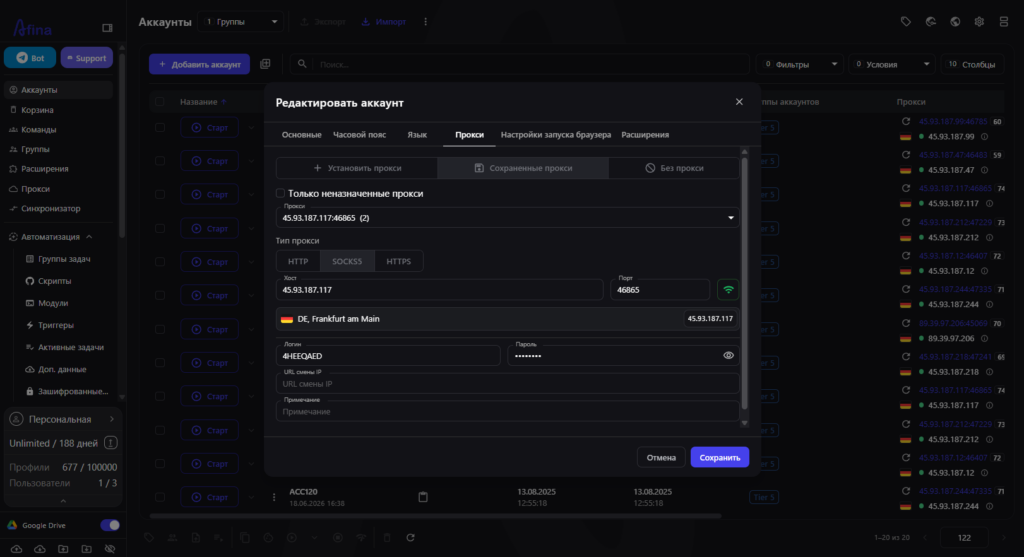
Proxies in Afina can be added during profile creation or through the dedicated proxy section. HTTP, HTTPS and SOCKS5 are supported. Each proxy record can include host, port, login, password and an IP change URL if the proxy provider supports it.
Proxy assignment can also be handled in bulk. In the account table, users select the needed profiles and assign proxies through the top action panel. Afina can filter for unused proxies, which helps avoid attaching the same IP address to multiple profiles by mistake.
Proxy checking is built in. Afina shows active or inactive status, outgoing IP address and geolocation. This is useful before launching sessions, because weak or inactive proxies can be replaced before they affect the workflow.
For proxy-heavy workflows, UDP over SOCKS5 is a relevant feature. Afina can use UDP, QUIC and HTTP3 automatically when the SOCKS5 proxy itself truly supports UDP. That condition matters: not every proxy service handles UDP correctly, and unstable support may create network mismatches.
Core features for multi-accounting
Afina is built around browser profiles. In each profile, users can configure operating system, User Agent, hardware parameters, window size and other fingerprint components. Fingerprints are generated based on real devices, not random values.
For daily work, the main value comes from the combination of features:
- isolated profiles with separate cookies, localStorage, cache and network settings
- account table with launch controls, tags, groups and quick editing
- bulk profile creation and import from Excel or TXT
- cookie import and export in JSON or TXT
- Cookie Robot for automatic cookie collection and profile warm-up
- time zone and language settings based on IP
- AES-256-CBC encryption for sensitive account data
This is especially useful when profiles are expected to live for more than one short session. A team needs to preserve structure: which account belongs to which project, which cookies were loaded, which proxy is attached, who works with the profile and when it was launched.
Automation without repetitive manual work
Proxy and multi-account workflows contain many repeated actions. Open pages, check status, fill a form, warm up a profile, import cookies, distribute tasks across accounts. Done manually, this quickly becomes slow and error-prone.
Afina includes a visual script editor. Scenarios are built from ready-made blocks on a canvas, connected with arrows and checked step by step when needed. For heavier processes, Afina also supports Headless and Browserless modes.
For ready-made tools, Afina provides an automation catalog. Users can search scripts and modules, filter them by tags, read descriptions and download selected items into the Afina workspace. The relevant documentation is available in the Afina automation catalog.
When there are many scenarios, task groups help control execution. They can define schedules, time limits, the number of parallel active sessions, retries after errors and task priorities. Active tasks are monitored in a separate table where users can view logs, stop processes and open the related script.
Practical use cases
Afina is most useful when proxies alone do not solve the problem. The workflow needs a proxy, profile, cookies, fingerprint and process to stay aligned. Here are several practical cases.
Regional workflows. A team creates profile groups for different countries or regions, assigns matching proxies, enables language and time zone by IP, then checks proxy status before launching sessions.
SMM and content operations. Profiles are separated by brand, client or platform. Tags and groups make sessions easier to find, while the synchronizer can repeat actions from the main window across other open accounts when that workflow is appropriate.
eCommerce and marketplace work. Separate profiles can be used for different stores, dashboards or operational roles. Cookies and profile data stay isolated, while bulk actions make account maintenance faster.
Browser process automation. Scripts can run on one or several profiles, task groups distribute load, and the active task table shows what is running right now.
AI automation through MCP. Afina’s MCP server works as a local bridge to the HTTP API at 127.0.0.1:50778 and requires an API key. It lets AI agents work with accounts, browser actions, scripts, tasks, proxies and data, while the actual execution remains inside the Afina desktop app.
Promo codes for new users:
- SALE20 – 20% off all plans except Max
- SALE30 – 30% off the Max plan
FAQ
Can Afina be used only for proxy management?
Yes, but its stronger use case is connecting proxies with browser profiles, fingerprints, cookies, groups and automation. That is more useful for regular multi-account workflows.
Does Afina support SOCKS5?
Yes. Afina supports HTTP, HTTPS and SOCKS5. UDP, QUIC and HTTP3 work automatically when the SOCKS5 proxy itself supports UDP.
Can proxies be assigned in bulk?
Yes. Users can select profiles in the account table and assign proxies through a bulk action. Afina also supports filtering for unused proxies.
Does Afina include automation?
Yes. Afina includes a visual script editor, an automation catalog, task groups, active task monitoring and Cookie Robot for automatic cookie collection and profile warm-up.
Can AI agents work with Afina?
Yes. Afina provides a local MCP server. It works through the HTTP API, requires an API key and lets AI agents perform actions inside the Afina desktop app.

Would you like to receive a personalized offer?
If you need technical advice or have a specific request, please contact us.