
Common Mistakes Beginners Make with Mobile Proxies (and How to Avoid Them)
05 Jun 2026
Reading time ~ 11 mins
Most people don’t lose money on mobile proxies because they picked the wrong provider. They lose it because they did something dumb with a perfectly good one. I’ve watched it happen. I’ve done half of it myself.
This is the list I wish someone had handed me three years ago, before I torched a batch of accounts and blamed the IPs for a problem that was sitting in my own browser config.
Let’s go through what actually kills beginners. Not the theory, the specific expensive mistakes that show up over and over.

Mistake #1: Trusting the word “mobile” on the dashboard
This is the big one. The one that costs the most.
A provider slaps “4G/5G mobile” on the pricing page, the dashboard has a little phone icon, the Trustpilot rating looks fine, and the pool is actually residential IPs wearing a costume. Or worse, recycled datacenter ranges that got blacklisted six months ago.
Nobody checks. That’s the whole problem. Beginners assume the label is true because checking sounds technical and scary.
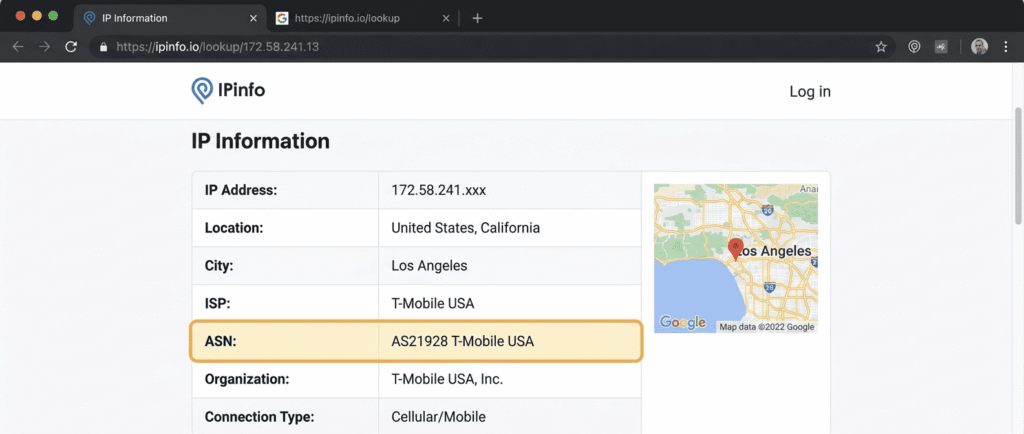
It isn’t. Paste the proxy IP into IPinfo or BrowserLeaks and look at one field: the ASN. A real mobile proxy shows a carrier. T-Mobile USA is AS21928. Verizon (Cellco Partnership) is AS22394. AT&T runs AS7018. Vodafone, Orange, EE, Telefónica, all carriers, all verifiable in about ten seconds. Cross-reference with a second tool too, like Whoer or DNSLeakTest, so you catch a dirty DNS or a blacklist hit the first lookup missed.
If that ASN field says a hosting company name, or some “Cloud Networks LLC” nobody has ever heard of, you don’t have a mobile proxy. Doesn’t matter what the invoice says.
Before you commit to anyone, honestly, just cross-check them against an independent ranking. Mobile is one slice of a bigger market, and the same vetting logic holds across all of it, so I keep toproxylab’s proxy rankings open in a tab when I’m sizing up somebody new. Claimed pool size, real per-GB pricing, uptime, all side by side. Catches the gap between the marketing page and reality fast. Marketing pages lie. Benchmarks you didn’t pay for don’t have a reason to.
Mistake #2: Rotating IPs way too aggressively
New users get excited about rotation. Fresh IP every request, right? Maximum anonymity?
No. That’s a tell.
Real humans don’t switch carrier IPs every two seconds. A person browsing Instagram keeps the same IP for the whole session, minutes, sometimes an hour. So when your “account” jumps across five IPs in thirty seconds, the platform’s antifraud doesn’t see anonymity. It sees automation. Bang, flagged.
Use sticky sessions for anything tied to an identity. Ten to thirty minutes minimum per IP for social logins and checkout flows. Rotate on-demand, when you decide there’s a reason, not on some hair-trigger loop because it felt safer.
The flip side mistake is rotating too slow when you’re scraping. Different job, opposite need. Which brings me to the cooldown trap.
Mistake #3: Ignoring the rotation cooldown until it’s too late
Provider docs say “instant rotation.” You believe them. Then your scraper crawls along at a tenth of the speed it should and you spend a Friday night convinced your code is broken.
It’s not your code. It’s the cooldown floor.
Some providers enforce a 3-10 minute minimum between rotations, buried somewhere they hope you won’t read. If your job needs 10 requests a second and the proxy refuses to hand you a new exit more than once every four minutes, the whole pipeline chokes.
I lost a real job to this in early 2025. Needed to pull around 80,000 pages off a mobile commerce app in under six hours, docs promised instant rotation, actual cooldown was four minutes. Took me 90 minutes of debugging to even realize the proxy was the bottleneck. Test the cooldown by hand before you trust the marketing copy. Fire twenty rotation requests through cURL or your scraper, time them, count the unique IPs.
Mistake #4: Forgetting the User-Agent has to match the IP
Here’s the one that still stings.
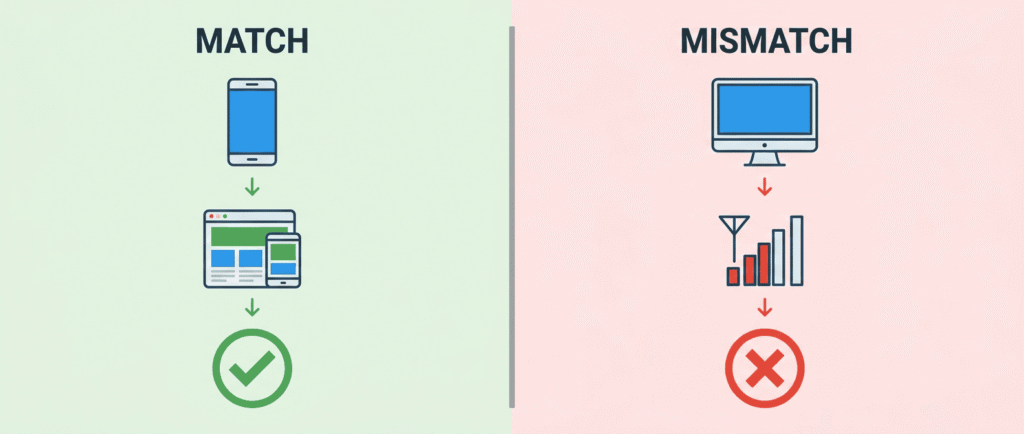
A mobile carrier IP needs a mobile browser fingerprint. iPhone Safari riding a T-Mobile IP looks like some guy scrolling on the subway, totally normal. Chrome on Windows 11 sitting on that same T-Mobile IP looks like exactly what it is: a bot.
I nuked thirty fresh IG accounts in about forty hours once because I switched a profile batch from a resi pool to mobile and forgot to flip the UA template. Carrier IP, desktop user-agent, instant contradiction. The platform reads that mismatch before you’ve even posted anything.
It goes deeper than the UA string too. Screen resolution, device pixel ratio, touch support, the navigator.platform value, all of it should say “phone” when the IP says phone. A 2560×1440 viewport on a Vodafone mobile IP is a contradiction no carrier metadata can save. Match the whole device context to the IP. Every time. It’s a thirty-second setting that saves entire account batches.
Mistake #5: Running mobile proxies naked, with no anti-detect browser
The IP is half the disguise. People forget there’s a second half.
Even with a spotless mobile IP, your browser leaks your real device through Canvas fingerprinting, WebGL, audio context, font enumeration, a dozen surfaces. Doesn’t matter how clean the network layer is if the browser itself is screaming “same machine, fortieth account today.”
Pair the proxy with an anti-detect browser that gives each profile its own isolated fingerprint and its own cookie jar. This isn’t optional for serious account work, it’s the baseline.
And kill WebRTC while you’re in there. Mobile proxies hide your network IP beautifully, then a WebRTC STUN request cheerfully broadcasts your real IPv6 straight out of the browser and torches everything. Override it or disable it, then verify it’s actually off at BrowserLeaks before you log into anything.
Mistake #6: Believing “unlimited bandwidth”
There is no unlimited. There’s a Fair Usage Policy with a soft cap, usually 100-300 GB per port per month, and once you cross it your speed quietly drops to dial-up territory (1-5 Mbps) and you wonder why everything got slow.
Honest providers print the number. The rest bury it in the ToS and play innocent when you complain. Ask for the cap in writing before you pay. If they hedge, you already have your answer.
While we’re on cost: a fair price for shared rotating mobile sits around $1-3 per GB right now. Dedicated ports run $80-200 a month for premium carriers. Watch for the pickpocketing too, PAYG surcharges of 30-50% on top of the listed rate, “premium geo” tax on US or UK targeting, sticky-session fees past five minutes, per-port and per-GB charges stacked together. Anyone quoting $400 for a single shared port without a very specific reason is taking you for a ride.
Mistake #7: Skipping country, city, and carrier targeting
Beginners pick “any IP in the country” and move on. Then the social account dies and they can’t figure out why.
Platforms cross-check the IP’s geolocation against the profile’s stated location. Profile says Austin, IP exits in Newark, the account looks fake because it kind of is. Social work on Instagram, TikTok, or X needs city-level targeting that matches the persona. Ad verification needs carrier targeting, because ad inventory gets bought per carrier and you have to see what each carrier’s users actually see. App testing needs specific device plus carrier pairs. Match the targeting to the job instead of grabbing whatever’s cheapest, and remember carrier-specific exits are rarer and usually carry a surcharge.
Mistake #8: Picking the wrong proxy type for the platform
Mobile isn’t always the answer, and beginners burn a budget assuming it is. It costs 3-5x what residential does per gigabyte. Sometimes that premium is wasted.
Pick mobile when the target weights carrier metadata heavily: Instagram, TikTok, X, Snapchat, plus aggressive antifraud on sneakers, ticketing, and banking. Nike SNKRS and Shopify drops block resi and datacenter ranges hard but rarely touch mobile blocks because of the Carrier-Grade NAT problem (thousands of real subscribers share one IP, so platforms can’t evict everyone).
Pick residential for general e-commerce and search at volume, like Amazon, Google, eBay, where a 5x mobile premium makes no sense. Pick ISP static when you need one fixed IP per account for months: payment systems, business accounts, anything where stability beats rotation. Most real operations end up mixed. Mobile for social, resi for scraping, ISP for the long-haul logins.
Mistake #9: Paying for a year before testing for an hour
The annual discount looks great. It exists for a reason.
Never commit long-term to a provider you haven’t run real load through. Start with their smallest tier, two gigs, five gigs, whatever the floor is. Then actually vet it:
- Pull 5-10 random IPs through IPinfo, BrowserLeaks, and Scamalytics. ASN has to be a real carrier, fraud score has to stay under 25/100. Above that, the pool’s dirty and platforms will know.
- Speed test on fast.com or Cloudflare’s speed test. Tier-1 mobile should give you 15-50 Mbps. Under 10 means they’re oversubscribing the pool and you’re sharing a modem with thirty other customers right now.
- Verify rotation by hand. Twenty requests rotating, did you get twenty IPs? Twenty sticky, did it hold? You’d be surprised how often it’s not.
- Run your actual workload for 24 hours. Not a demo. The real thing. This catches the throttle cap and the flaky exit nodes that look perfect in a five-minute trial.
Mistake #10: Validating only at the network layer
A proxy passes every check-tool and still gets you banned on IG. How?
Because the tools test the network. They don’t test your browser-side fingerprint, your behavior, your cookie state, the rhythm of your clicks. A proxy can be flawless and your setup can still reek of automation. Logging in three accounts from the same machine in two minutes, pasting passwords instantly, never moving the mouse, that’s a behavioral signature no clean IP fixes.
Test inside the real workflow. Log into the actual platform, do the actual thing, watch what happens over a day or two. End-to-end. The network passing is necessary, not sufficient.
Mistake #11: Ignoring the SOCKS5 and protocol details
This one’s quieter but it bites the technical crowd. HTTP and HTTPS proxies are universal, every provider has them. What people forget to check is SOCKS5, specifically whether it supports UDP associate. Without it, anything that isn’t browser HTTP, so WebRTC, gaming traffic, voice, P2P, UDP streams, just won’t tunnel. If your workflow touches any of that, confirm SOCKS5 with UDP before you buy, not after.
Same goes for authentication. Username and password auth lets you fire the same proxy from any machine, which is what you want if your own IP moves around (it will, because you’re a human on the internet). IP whitelisting is more secure but breaks the moment your home IP changes. Good providers support both. Pick based on whether you value flexibility or lockdown.
The short version
Mobile proxies are a tool, not a magic cloak. Most beginner disasters come down to a handful of habits: check the ASN yourself, match the full device context to the IP, don’t over-rotate, pair with an anti-detect browser, kill WebRTC, get the bandwidth cap in writing, and test with real load before paying for a year.
Do those and you’ll dodge most of the providers and mistakes that exist to bleed newcomers.
Now go pull the ASN on whatever pool you’re paying for right now. If it doesn’t say a carrier name, you already know.

Would you like to receive a personalized offer?
If you need technical advice or have a specific request, please contact us.