
What is a proxy and how to choose one for your task
20 Aug 2025
Reading time ~ 13 mins
A proxy server is an intermediary between your device and a website. It sends a request on your behalf and returns the response, substituting its IP address. As a result, you get access to the content you need, reduce the risk of blocking, and can work with multiple accounts more securely.
- When is it useful. Access to regional content, working with advertising and social networks, parsing, automation, additional privacy in the browser and applications.
- What to choose for specific tasks. Data center proxies are suitable for maximum speed and cost savings; when a “human” footprint is important and sites are more tolerant, residential or mobile proxies are suitable; for a stable static address, ISP proxies are suitable.
- By protocols. HTTP/HTTPS is convenient for web tasks and parsers, SOCKS5 is universal for applications and messengers.
- By IP version. IPv4 is compatible everywhere; IPv6 provides large pools and cost-effectiveness if services support it.
- How to start. Define your goals, choose a type for your scenario, connect in your browser or the program you need, check the IP on the checker. Ready to try – see proxy rates.
What is a proxy in simple terms
A proxy is an intermediate server that accepts your request to a website, sends it on its behalf, and returns the response. For the target resource, you look like a user with the IP address of the proxy. This helps to change geolocation, distribute the load during automation, and carefully separate work sessions.
It is important to understand how proxies differ from other technologies. NAT on the router simply “forwards” your connections and does not change the external IP – websites still see the address of your provider. VPN creates an encrypted tunnel and changes the route of all device traffic to one output IP. Proxies work specifically: you configure a specific browser, parser, or bot and get control – you can run several independent sessions, manage the pool of addresses and rotation.
How it looks in practice: the application sends a request not directly, but to the proxy (host:port with login/password or by a list of allowed IPs). The proxy establishes a connection with the site and transmits the response back. For web tasks, HTTP/HTTPS is often used (including tunneling via CONNECT), for applications – universal SOCKS5. If the site works over HTTPS, the content is transmitted encrypted between you and the site; the proxy only sees the facts of connections, not the form data.
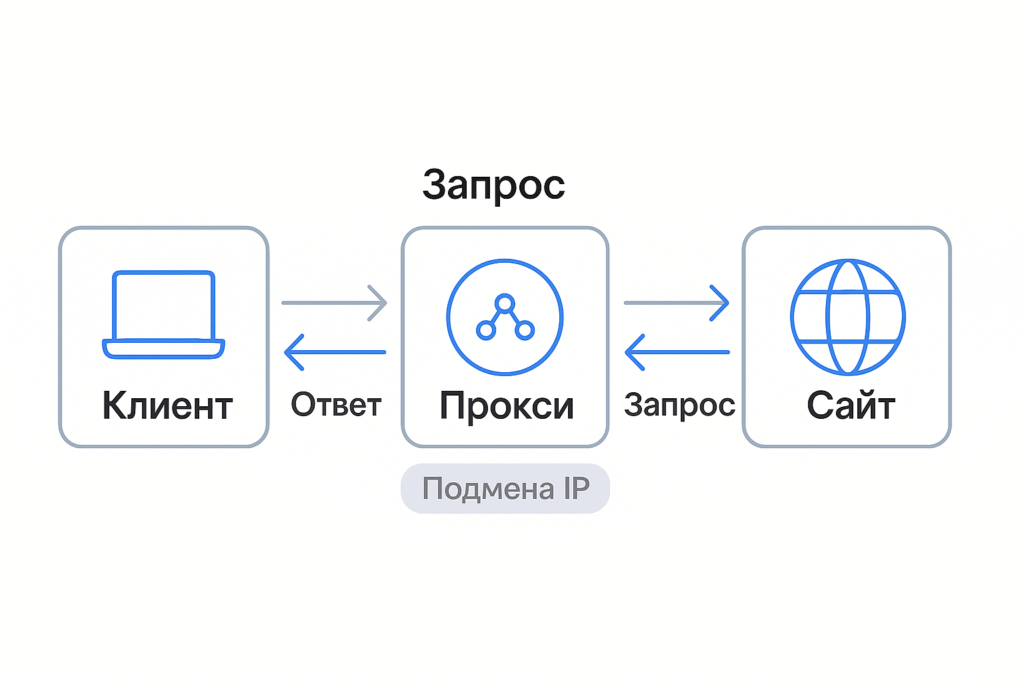
How a proxy works
The easiest way to imagine a proxy as a “translator” between an application and a website.
- The application sends a request not to the site, but to the proxy address (host:port).
- The proxy establishes a connection with the target resource and forwards your request on its behalf.
- The response comes to the proxy and is returned to the application. For the site, you are the IP address of the proxy.
Protocols in a nutshell
- HTTP/HTTPS proxies. Work with web requests. For secure sites, the CONNECT method is used, which creates a tunnel to the destination host. The content of HTTPS remains encrypted between you and the site – the proxy only sees the fact of the connection and metadata (address, time, volume).
- SOCKS5. A universal option at the TCP/UDP level. Suitable not only for browsers, but also for applications, messengers, parsers, and bots. It does not interfere with application protocols and is therefore more flexible in extraordinary cases.
Authorization and access
- Login/password – specified in the settings.
- IP list – access is allowed only from your addresses.
- In mass tasks, address pools and IP rotation with a specified interval are often used.
What affects quality
- Delay (ping) – affects responsiveness.
- Bandwidth – important for downloading media and high-speed parsing.
- Stability (uptime) and timeouts – determine how often sessions are interrupted.
- Anonymity – correct work with headers and no DNS/WebRTC/IPv6 leaks.
Bottom line: the proxy does not “break” encryption and does not change the operation of your programs – it only adds an intermediate node with the required IP and access rules. It is precisely because of this that you can fine-tune scenarios, separate sessions, and scale connections without unnecessary risks.
Where proxies really help
Multi-accounting and SMM. When platforms strictly track behavior, it is important to separate sessions, countries, and browser fingerprints. For a “human” profile and fewer captchas, they take addresses of home providers – the residential proxy format is suitable. If anti-fraud is especially strict, dynamic IP rotation from mobile operators helps – mobile residential proxies.
Parsing and automation. A large volume of requests requires a pool of addresses, limits, and rotation. For the best ratio of speed and price, data center solutions are most often chosen; for sensitive resources, part of the traffic is transferred to “human” IPs. Tariffs without traffic restrictions are more profitable on permanent streams – see unlimited residential proxies.
Checking geo-delivery and local prices. Marketers and product teams test how the site looks for different countries and cities, check prices and availability. The necessary geos, stable sessions, and rotation control are important here.
Access to regional content and SaaS. If the service is closed to your region or shows a different catalog, proxies help to “be” in the right country without rebuilding the network configuration of the entire device.
Teamwork and traffic control. A local proxy in the office simplifies permissions for sites, saves traffic by caching, and sets uniform security rules.
The selection tip for tasks is simple: speed and price – data center; maximum trust – residential; complex platforms and frequent rotation – mobile. In the next section, we will analyze the types in more detail and show where which option is appropriate.
Types of proxies
Proxy types differ in purpose, origin, protocol, level of anonymity, and IP version.
By purpose
- Forward proxy – a classic intermediary for the client: the application gets access to the Internet through a proxy.
- Reverse proxy – stands in front of the site and distributes incoming traffic, caches, protects (not for user anonymity).
By origin/location
- Data center (DC). Maximum speed and predictability, optimal for parsing and inexpensive large-scale tasks.
- Residential. IPs of home providers: natural behavior for platforms, higher tolerance for multi-accounting. Check out our article on residential proxies.
- Mobile. Addresses of 3G/4G/5G operators with frequent rotation: the best choice for demanding platforms.
- ISP proxies. Dedicated static IPs from an Internet provider: a compromise between price, stability, and trust.
By protocol
- HTTP/HTTPS. Convenient for web tasks and parsers; support CONNECT tunneling for HTTPS.
- SOCKS5. Universal transport at the TCP/UDP level – suitable not only for browsers, but also for applications and bots.
By anonymity level
- Transparent proxies transmit the original IP; anonymous proxies hide it; elite proxies mask the very fact of using a proxy.
By IP version
- IPv4 – maximum compatibility with services.
- IPv6 – huge pools and cost-effectiveness; choose if the sites you need support it.
A quick guide to choosing
| Type | Where is it appropriate | Pros | Limitations |
| Data center (DC) | Parsing, load testing, mass tasks | Speed, price, predictability | Easier to detect on strict platforms |
| Residential | SMM, multi-accounting, sensitive services | Natural traffic, higher tolerance | More expensive than data center proxies |
| Mobile | The most demanding platforms, frequent rotation | High trust, dynamic IPs | Dependence on rotation/speed |
| ISP proxies | Static trusted IPs, long sessions | Stability, balance of price/trust | Pools are smaller than those of data centers |
| IPv6 residential | Scaling by countries/subnets | Large pools, cost-effectiveness | IPv6 support is required on target sites |
Proxy vs VPN — what to choose for the task
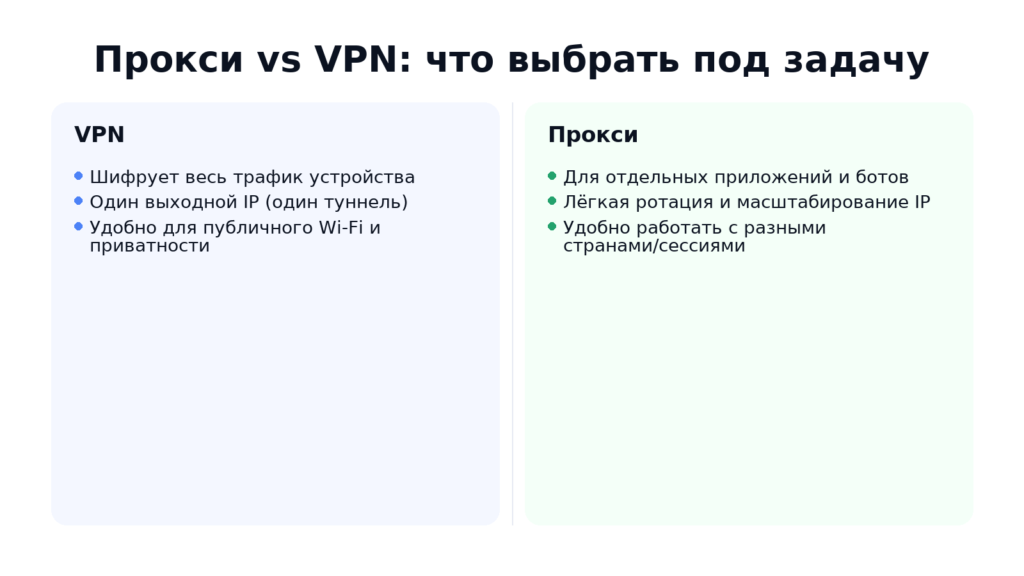
VPN directs all device traffic through an encrypted tunnel to one output node. This is convenient for general privacy, working from public networks, and accessing services closed to your region. The disadvantages are a single “funnel” for all applications, it is more difficult to parallel different countries and IPs, and higher overhead costs.
Proxies are configured specifically – for a specific browser, bot, or parser. You can run dozens of independent sessions, manage pools of addresses and rotation, and choose a country for each task. Overhead costs are lower and scaling is easier. Encryption depends on the protocol and the site: with HTTPS, the content is already encrypted between the client and the resource.
When is what appropriate
- Everyday privacy, public Wi-Fi, corporate access → VPN is more convenient.
- Multi-accounting, SMM, parsing, A/B tests of geo-content, simultaneous work with different countries → proxy is more convenient (flexible rotation and separate IPs for each session).
- Long stable sessions with a “human” profile → proxy with provider addresses (residential/mobile/ISP).
- Maximum speed on volumes → data center solutions.
Is it possible to combine
Yes. A common scenario is VPN as an external “case” for the network, and inside the application – a proxy for managing IP and geo. Important:
- check DNS and WebRTC for leaks;
- understand the exit chain (so as not to get an unexpected region);
- do not mix too aggressive rotation with “long” sessions.
How to choose safely: a checklist
- Provider and reputation. See how many years they have been on the market, whether there is legal data, SLA, and real cases.
- Networks and ASNs. The more diverse the subnets and autonomous systems, the lower the chance of mass bans and captchas.
- Uptime and stability. The norm is ≥99% uptime, predictable timeouts, without “drawdowns” during peak hours.
- Speed and delay. For parsing and loading media, bandwidth and ping to target sites are important.
- Anonymity without leaks. Check headers, DNS/WebRTC/IPv6 leaks, and correct operation of the HTTPS tunnel.
- Rotation and pools. Managed intervals, static/dynamic IPs to choose from, the ability to issue “1 account = 1 IP” are needed.
- Geography. Available countries/cities, pool depth in the required regions, quick addition of new locations.
- Access and security. Choice between login/password and IP-whitelist, restriction by CIDR, connection logs.
- Support and integrations. 24/7 responses, documentation, ready-made instructions for browsers, parsers, and bots, if necessary – API.
- Tariffs and test. Trial access/money-back guarantee, honest quotas for traffic and sessions.
Set up and check a proxy: a short guide
- Get access. Write down the host, port, and authorization method – login/password or adding your IP to the whitelist. If you have a dynamic IP at home, authorization by login/password is preferable.
- Configure in your browser or application.
- Browser: specify HTTP/HTTPS or SOCKS5 proxy in system/network settings. For HTTPS, enable tunneling (usually this is done automatically via CONNECT).
- Parser/bot: add host:port and authorization; if necessary, select “sticky” sessions or rotation.
- Check that the IP and geo are correct. Open any IP-checker, make sure of the country/city and the required IP version (IPv4/IPv6). Check the ASN, if the “human” origin of the address is important.
- Exclude leaks. Check DNS/WebRTC/IPv6. If necessary, disable WebRTC in the browser or enable “proxy DNS” for SOCKS5 so that name requests do not go around.
- Check through a proxy checker. Measure ping, stability, loading speed. Check if there are frequent timeouts and breaks on long sessions.
- Debug the rotation policy and limits.
- For multi-accounting, use the rule “1 account = 1 IP” or small groups of accounts per IP.
- For parsing, set the frequency of requests, pauses, and backoffs so as not to catch 429/captchas.
- For long sessions – static/sticky sessions without aggressive rotation.
Typical errors: incorrect protocol (SOCKS instead of HTTP and vice versa), wrong port, IP not added to the whitelist, mixing VPN+proxy with an unexpected change of region, DNS leaks, IPv6 enabled when the target service does not support it.
Frequently asked questions about proxies
- Do proxies encrypt traffic?
Not by themselves. HTTP proxies do not encrypt, and with HTTPS, data is encrypted between you and the site via TLS. SOCKS5 is a transport level without encryption. A “end-to-end” encrypted channel is needed – use HTTPS sites or combine with VPN. - Why does the site recognize the proxy and ask for a captcha/block?
Reasons – behavioral patterns (frequency, parallelism), known subnets and ASNs, inconsistent headers, DNS/WebRTC/IPv6 leaks, traces from cookies/fingerprint. Natural IPs (residential/mobile/ISP), request limits, account “warming”, correct headers, and disabling leaks help. - How many IPs are needed for multi-accounting?
A safe rule is “1 account = 1 IP”. Sometimes small groups are allowed (2–3 accounts per IP) with different sessions and fingerprints. For accounts with long sessions, choose static or “sticky” addresses. - Is it possible to use VPN and proxy at the same time?
Yes: VPN is an external encrypted tunnel, proxy is IP and geo management for a specific program. Check what DNS requests go through, and do not mix aggressive rotation with long sessions. - How do ISP proxies differ from data center proxies?
ISP proxies are static addresses from real providers: higher site trust and stability of long sessions than data center proxies, at a more moderate price than “pure” residential proxies. - When exactly should I take mobile proxies?
When anti-fraud is strict (social networks, marketplaces), frequent rotation and a “human” profile of operator traffic are important. The disadvantages are that speed and predictability are lower than those of data center/ISP proxies. - IPv4 or IPv6 — what to choose?
IPv4 – maximum compatibility. IPv6 – huge pools and cost-effectiveness if the target services support it. For large-scale tasks, it is reasonable to combine: the main stream is IPv6, sensitive points are IPv4. - Sticky vs rotating — what’s the difference?
Sticky keeps the same IP for a specified period (suitable for personal accounts, payments, moderations). Rotating changes the address for each request/interval (for parsing and load distribution). Use what corresponds to the scenario and platform policy.
Which proxy to choose: a brief conclusion
A proxy is a tool for the task. If speed and price are important, start with data center proxies. If you need a “human” profile and higher site tolerance, take residential proxies. Mobile proxies are suitable for the most strict services and frequent rotation. If you need a static, reliable address for long sessions, choose ISP proxies. To scale by country and large pools, it makes sense to add IPv6 where it is supported.
The best way is to test a small pool for your scenarios (multi-accounting, parsing, geo-checks), configure rotation and limits, check for leaks, and only then scale.
Ready to choose a configuration and plan? We will help you choose proxies for your scenarios and choose the optimal payment model.
- Retriv.Market – A marketplace for accounts with one-click purchasing.
- The Best Anti-Detection Browser is BitBrowser for Multi-Accounting.
- NoCaptchaAI | The Fastest & Most Affordable AI-Powered Captcha Solver
- Dolphin Anty — an anti-detect browser for multiple accounts
- XLogin setup
- ixBrowser setup
- VMLogin setup
- MULogin setup
- GeeLark Setup
- How to set up a proxy in Google Chrome browser

Would you like to receive a personalized offer?
If you need technical advice or have a specific request, please contact us.