
Dolphin Anty — an anti-detect browser for multiple accounts
23 Feb 2026
Reading time ~ 6 mins
Modern affiliate marketing is impossible without a full stack of specialized tools. This becomes especially clear when scaling campaigns and managing multiple advertising accounts across different regions. Among all technical solutions, two components are absolutely essential: proxies and an antidetect browser.
Proxies provide access to offers in any geo and help bypass regional restrictions. An antidetect browser, in its turn, enables safe multiaccounting by bypassing antifraud systems and making each account appear as if it is launched from a separate, unique device.
This is critically important for scaling and reducing the number of bans as most advertising platforms actively fight for user uniqueness. Without proxies and an antidetect browser platforms can easily detect links between accounts through browser fingerprints, behavioral patterns and IP addresses.
Today, we’ll take a closer look at Dolphin Anty and how proxy management works inside the browser.
What Makes Dolphin Anty Different from Other Antidetect Browsers
Dolphin Anty is a tool built by affiliates for affiliates. It reflects real-world market requirements and addresses the everyday challenges faced by traffic teams.
Advanced Fingerprint Spoofing
Dolphin Anty creates browser profiles that are fully isolated from each other and equipped with unique digital fingerprints. Each profile accurately simulates a real device including:
- Canvas and WebGL
- User Agent;
- Screen resolution
- Operating system parameters
- Time zone
- Language
…and many other parameters.
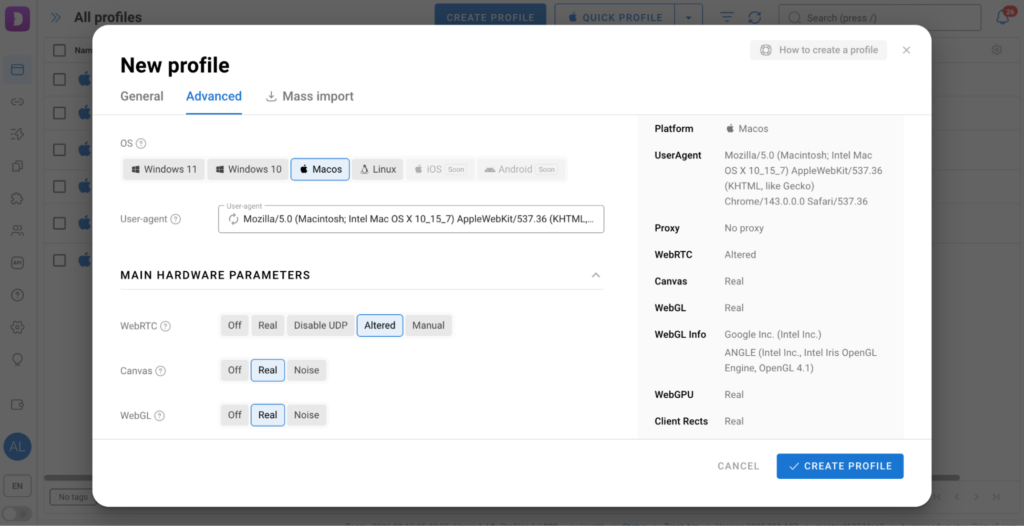
One feature worth highlighting is Device Name. This parameter is unique to Dolphin Anty and not available in competing solutions. It is especially valuable when working with platforms that have aggressive antifraud systems.
All fingerprints generated in Dolphin Anty are internally consistent and free of unrealistic combinations, which significantly reduces the risk of bans. And if the current configuration doesn’t fit your task or you simply don’t want to configure everything manually, you can generate a new fingerprint instantly with a single click using the “New Fingerprint” button.
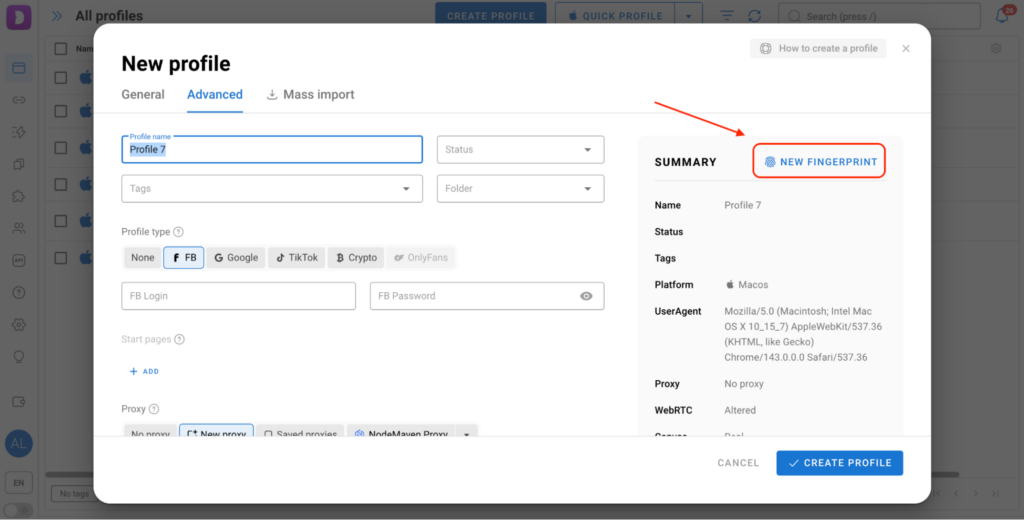
Each profile operates in a completely isolated environment. Cookies, device identifiers and browser metadata are never shared between accounts. This is especially important when working with platforms that are highly sensitive to user uniqueness, such as Google, Meta or TikTok.
Convenient Multiaccounting
Even when working with hundreds of profiles, the interface remains clear and easy to use. You can:
- Sort profiles;
Assign statuses, tags, and notes;
Group profiles into folders.
Таким образом, каждый профиль работает в полностью изолированной среде. Куки, идентификаторы устройств и браузерные метаданные не пересекаются между аккаунтами. Это особенно важно при работе с чувствительными к уникальности платформами, такими как Google, Meta или TikTok.
Удобный мультиаккаунтинг
Сортировать профили; - Assign statuses, tags, and notes;
- Group profiles into folders.
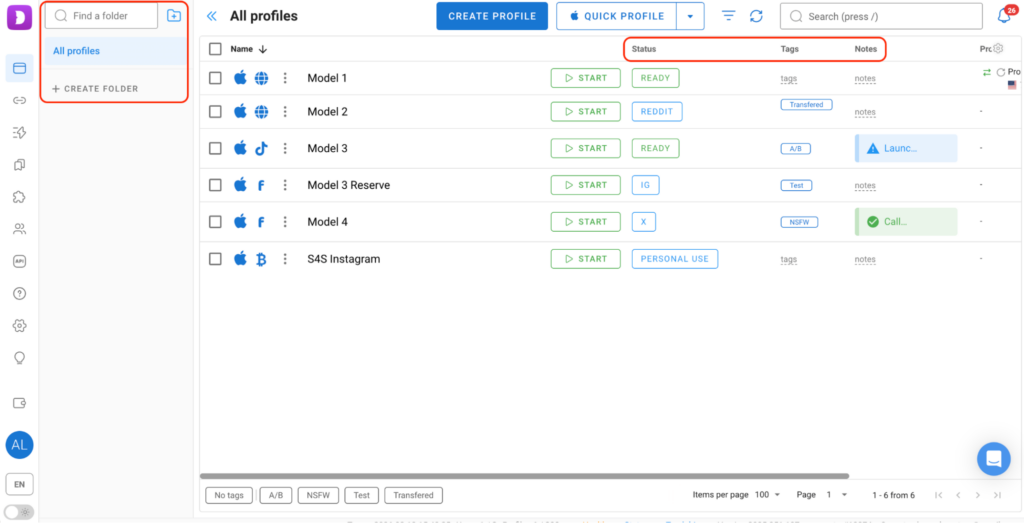
The built-in search with advanced filters allows you to find the required accounts in just a couple of clicks regardless of their total number.
Proxy Management
You can add proxies to Dolphin Anty in two ways. Let’s take a closer look at each of them.
Method 1: Adding a proxy during profile creation
Click “Create Profile”, scroll down to the “Proxy” section, select the “New Proxy” tab and enter the details you received from Prosox.
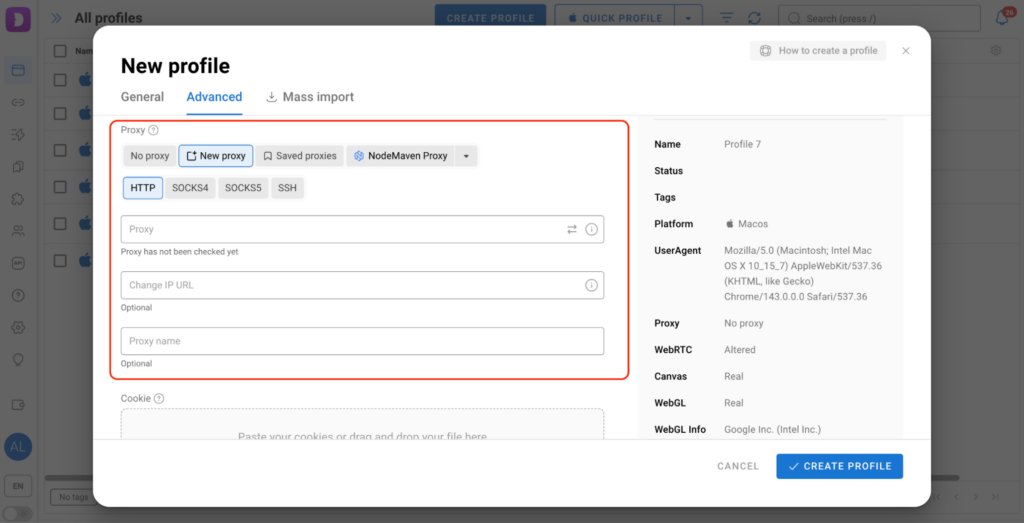
You can immediately check whether the proxy is working by clicking the icon with two arrows pointing in opposite directions. If everything is correct, a green checkmark will appear.
Method 2. Adding a proxy via the dedicated proxy section
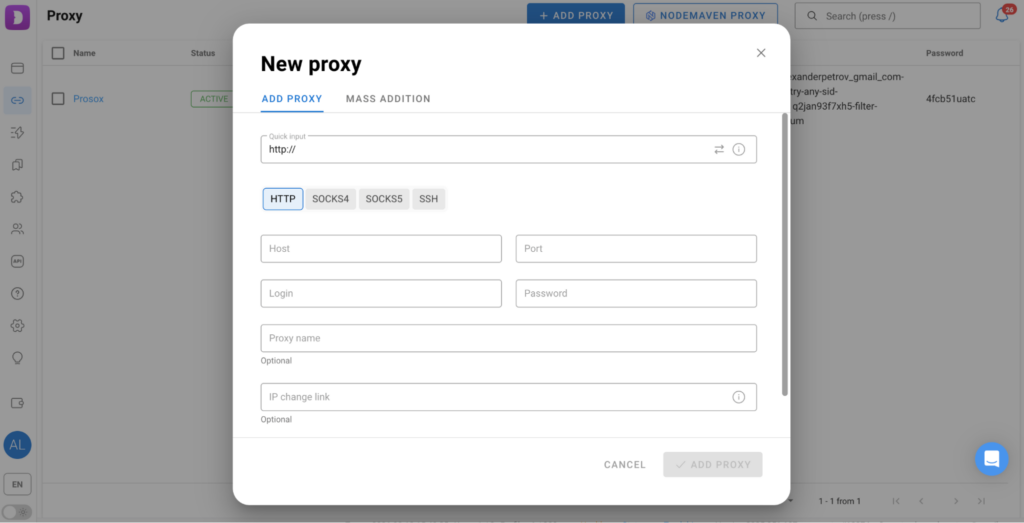
There is a “Proxies” section in the left-hand menu where proxies can be added either individually or in bulk.
For quick setup, simply paste the proxy details into the “Quick Input” field and Dolphin Anty will automatically distribute the data into the correct fields.
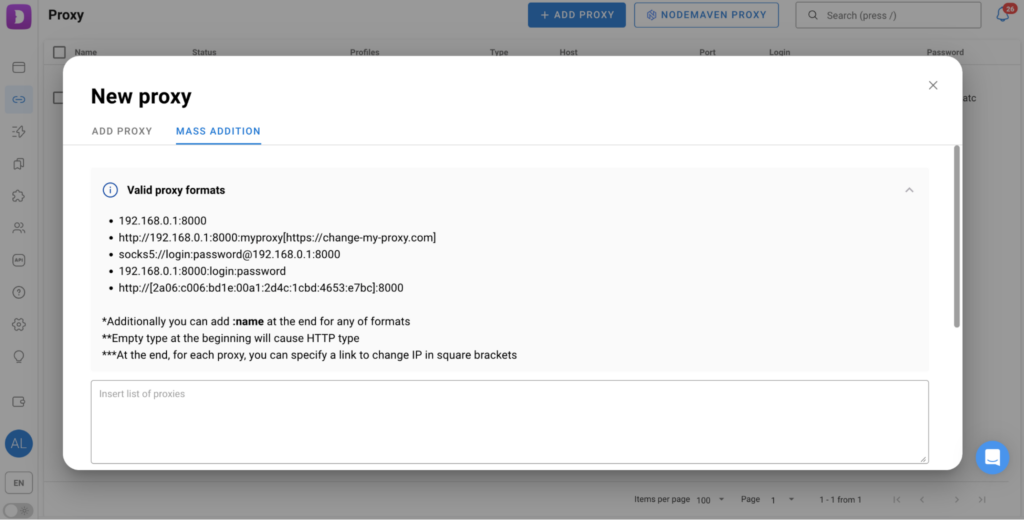
For mass imports, there is a separate block with detailed instructions on supported formats which helps avoid errors.
When creating multiple profiles, Dolphin Anty can also automatically assign proxies according to a selected scheme, for example manually or randomly.
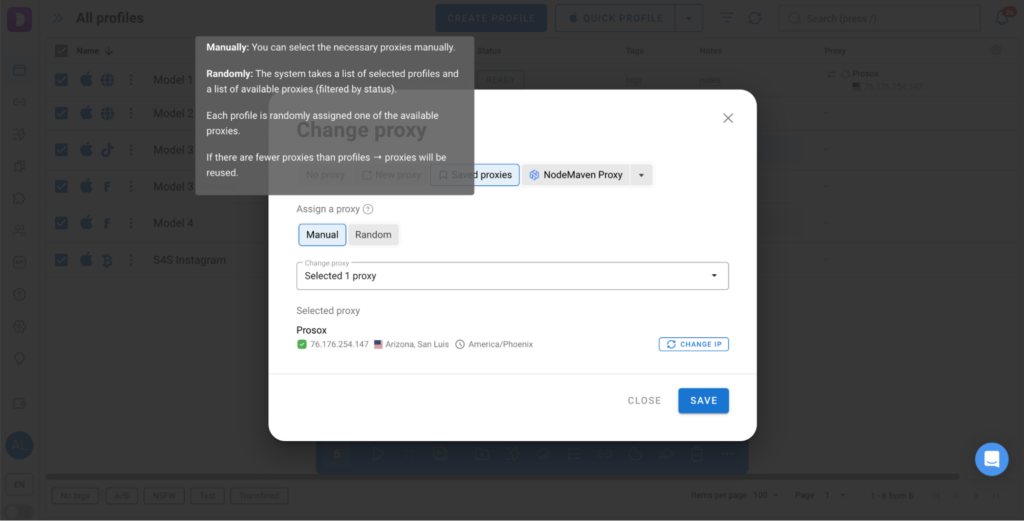
This helps reduce the risk of mistakes during scaling.
How Dolphin Anty and Prosox Complement Each Other
Dolphin Anty is responsible for profile isolation and digital fingerprint uniqueness while Prosox provides a stable IP infrastructure. Together they ensure that each profile:
- Behaves like a separate real device;
- Works from a unique and stable IP address;
- Bypasses all regional restrictions;
- Remains stable even during long sessions.
As a result, you get a predictable and reliable setup for managing any number of advertising campaigns.
Automation Tools
Dolphin Anty also offers several solutions to reduce manual work:
- Synchronizer allows you to repeat actions from the main profile across multiple others;
- Scenarios are an interactive map where you can create automated workflows without the need to write code manually;
- Cookie Robot automatically generates cookies on specified websites. It can work in the background or without loading images saving proxy traffic.
Team Work
Dolphin Anty is suitable not only for solo users, but also for teams of any size. The browser includes the necessary functionality for this.
You can assign roles — administrators, team leads and regular users — with different access levels. This level of activity control reduces the risk of errors and data leaks.
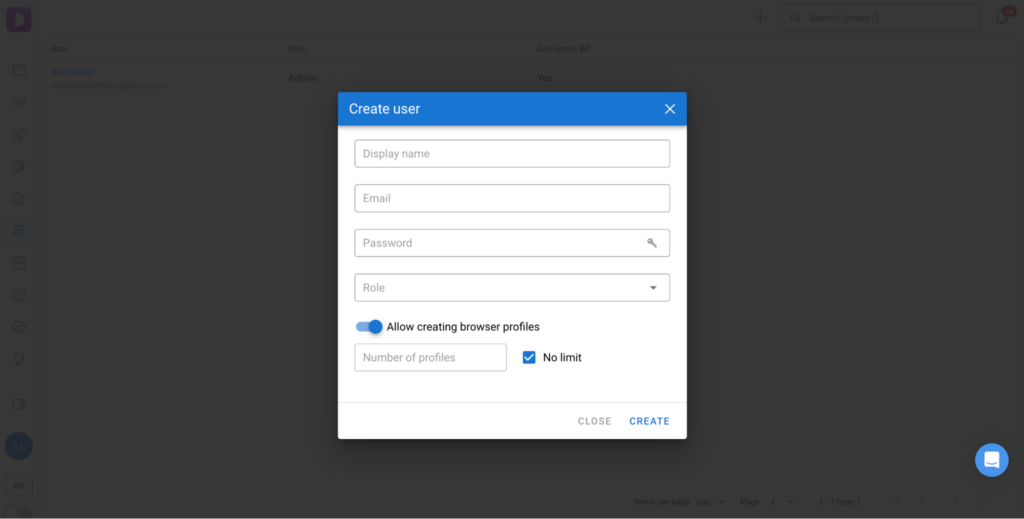
In addition profiles can be transferred or shared with flexible permission settings. This is especially important when working with shared budgets and advertising accounts.
Pricing
Dolphin Anty’s subscription adapts to different workloads from freelancers to agencies and affiliate teams. Pricing plans differ in the number of profiles, access to automation tools and team features:
- Free+ (Starter) — for beginners, from $10 per month for 10 profiles;
Base — for solo affiliates and small teams, $89 per month for 100 profiles;
Team and Enterprise — for large teams and agencies, with scalable plans starting at $159 and $299.
Conclusion
Dolphin Anty provides reliable fingerprint isolation, automation and convenient team work, while Prosox delivers stable and clean IP addresses. Together they make it possible to run advertising campaigns in any geo, on any platform and at any scale. - Base — for solo affiliates and small teams, $89 per month for 100 profiles;
- Team and Enterprise — for large teams and agencies, with scalable plans starting at $159 and $299.
Conclusion
Dolphin Anty provides reliable fingerprint isolation, automation and convenient team work, while Prosox delivers stable and clean IP addresses. Together they make it possible to run advertising campaigns in any geo, on any platform and at any scale.
- Retriv.Market – A marketplace for accounts with one-click purchasing.
- The Best Anti-Detection Browser is BitBrowser for Multi-Accounting.
- NoCaptchaAI | The Fastest & Most Affordable AI-Powered Captcha Solver
- XLogin setup
- ixBrowser setup
- VMLogin setup
- MULogin setup
- GeeLark Setup
- How to set up a proxy in Google Chrome browser
- How to set up a proxy in the Opera GX browser

Would you like to receive a personalized offer?
If you need technical advice or have a specific request, please contact us.